If you run a print business, you know exactly what margin compression looks like. Labor is expensive, equipment costs are up, and clients want their jobs yesterday.
The difference between a shop that scales and one that stalls usually comes down to workflow.
That is the job of a Print Management Information System (MIS). It takes the chaos out of quoting and production and replaces it with a structured, repeatable process.
We have spent the last 16 years building software for print businesses.
In this guide, we are going to walk through exactly what a Print MIS should do, why running five different software tools is costing you money, and how to choose a system that your team will actually use.
What is Print MIS Software?
Print MIS stands for Print Management Information System. In plain terms, it is software built specifically to run a print business.
Generic business software fails in print because it does not understand the estimating and production realities. It does not know that estimating a small-format digital run requires completely different logic than pricing a wide-format flatbed job.
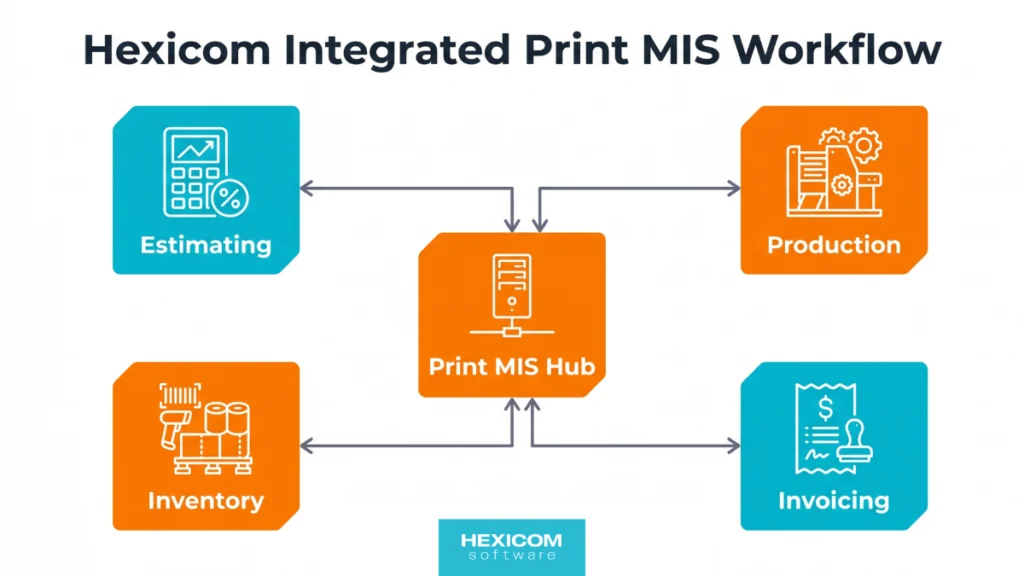
A true Print MIS does. It connects your estimating, production tracking, inventory, and invoicing into one central hub.
Core Features Every Print MIS Needs
While every shop operates a bit differently, any Print MIS you consider needs to handle these five functions without requiring workarounds.
Print Estimating & Quoting
Accurate quoting is non-negotiable. Your MIS must calculate costs based on your actual equipment, run rates, and material costs. It should also track when a quote was sent and prompt the sales team to follow up.
Job Tracking & Production Workflow
You need to know where every job is on the floor without walking out of the office to check. The software should generate detailed job tickets and provide a clean job board.
Just as importantly, it should filter information so your production staff only see what they need to run the job, rather than drowning them in sales data.
Inventory & Material Management
If your material costs are wrong in the system, your quotes will lose you money. The MIS needs to manage all your paper and substrates, and consumables, so your estimates reflect reality.
Invoicing & Accounting Integration
For small to medium shops, the smartest setup is a dedicated Print MIS for operations, that pushes data directly into a modern accounting platform like Xero or QuickBooks Online.
This keeps your operational workflow tight while leaving the heavy financial reporting to the tools built for it. It also kills double data entry.
CRM (Customer Relationship Management)
Your customer data, supplier details, and job histories need to live in the MIS. When a key staff member is out sick, the rest of the team should be able to pick up exactly where they left off.
The Real Cost of Disconnected Systems
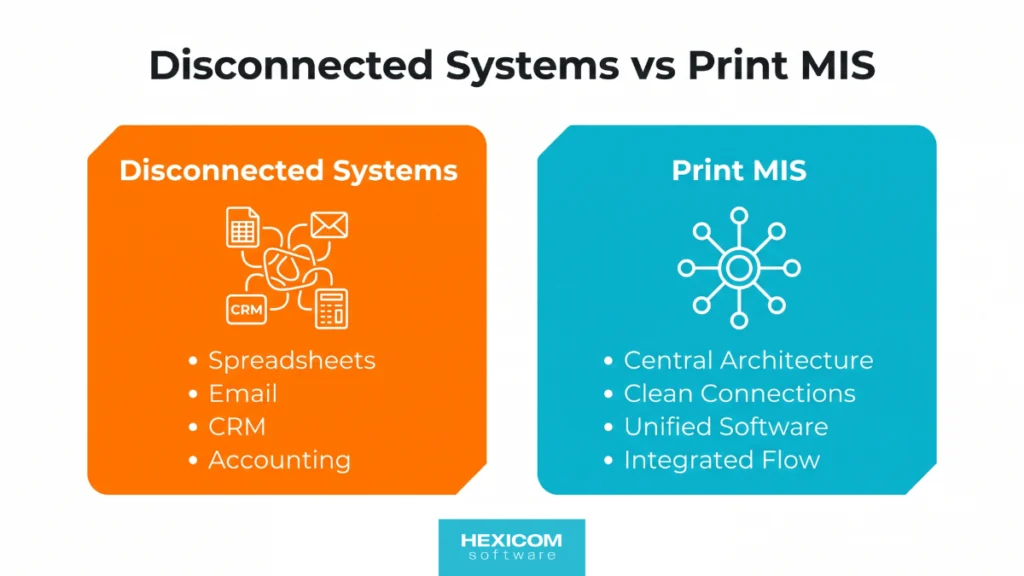
A lot of print businesses run on a mix of disconnected tools. They use spreadsheets for estimating, emails for art approvals, a generic CRM for sales, and separate accounting software.
This setup feels cheap because you aren’t paying a single, larger software subscription. But the real cost is hidden in the gaps between those systems.
Every time someone has to manually re-type an approved quote into a job ticket, or copy job details into an invoice, you are burning staff time and inviting human error. Those errors turn into incorrect specs, production delays, and expensive reprints.
Print MIS Cost vs. Real Savings
How to Choose the Right Print MIS
Selecting an MIS is a major operational decision. If you pick the wrong one, your team will fight it, and it will end up as an expensive paperweight. Here is how to approach the decision.
Map Your Workflow First
Before you look at software, document how work actually moves through your shop.
- How long do estimates take?
- Who touches a job?
- Where does data get entered twice?
- Where are the bottlenecks?
If you understand your friction points, you know exactly what the software needs to solve.
Avoid the Feature Trap
It is easy to get distracted by software that promises to do a hundred different things. Focus on the core functions you need to run the business. The best Print MIS is the one your staff will actually use — systems that are too complex have terrible adoption rates.
Evaluate the Provider
You are choosing a long-term operational partner.
- Do they understand your business requirements?
- What is their implementation process?
If a vendor agrees to every request without asking how your shop actually works, consider that a red flag.
The Future of Print MIS: Cloud & AI
The industry has firmly shifted to cloud-based platforms. The days of maintaining an expensive on-premise server are over. Cloud systems handle the hosting, security, and updates so you can focus on printing.
Artificial Intelligence is definitely the next major shift. We are not at the point where AI can reliably generate complex print quotes without human oversight — there are simply too many regional pricing variances and machine-specific rules.
However, AI is already proving useful for data and trend analysis, and administrative tasks. To take advantage of AI in the future, you need clean, structured data today. A modern Print MIS provides that foundation.
Why Growing Print Shops Choose HexiHub
At Hexicom Software, we built HexiHub specifically for small to medium-sized print businesses. We have spent over 16 years refining it with real print customers.
It is an all-in-one Print MIS that provides structure without unnecessary complexity. Whether you run a digital print shop, a wide-format signage business, or act as a print broker, HexiHub centralises your estimating, job management, and billing.
It is modular, so you can start with the core MIS and add online proofing, Web-to-Print portals, or warehouse management as your business scales.
Most importantly, we do not just hand you a login.
We work with you to configure the system, migrate your data, and train your staff.
Software only works when the people using it understand it.
And for people to understand the software they need quality training and support.
If you are ready to fix your workflow, book a demo of HexiHub today. We will show you exactly how it handles your specific business requirements.
Ready to fix your print workflow?
See exactly how HexiHub handles your specific business requirements.